← Blog
/

Computer use agents: What they are, how they work, and how to deploy them safely
High-quality human expert data. Now accessible for all on Toloka Platform.
Training datasets are what it needs to reason, adapt, and act in unpredictable environments
In late 2022, when AI became fully mainstream, with ChatGPT launching and reaching 100 million users in just 2 months, there were already signs of how rapidly AI systems would develop. Since this was the fastest adoption of any tech product ever, practitioners and AI researchers began studying the trajectory of this technology.
In fact, according to a paper on the past, present, and future of AI megasystems, autonomous systems would interact with computer systems in ways similar to how humans do. The researcher wrote that the AI challenges, once thought decades ago, have since been overcome by simply scaling up the size of AI systems. These models are now approaching the capacities of 'digital workers', and we are already witnessing this with the development of computer-use agents.
The evolution of AI systems has reached a point where we are no longer limited to chatbots. We now have computer-use agents, which are AI agents capable of perceiving computer screens, understanding the graphical user interfaces (GUIs), and performing tasks exactly as humans would. These agents have demonstrated the ability to automate tasks across a broader range of applications in controlled settings and emerging commercial deployments, such as data entry and multi-step processes in legacy systems.
However, with autonomy of such agents comes greater risks. Granting AI agents permission to interact with our core systems and data in the real world is a safety risk because these systems are often unpredictable. So, as computer use agents develop, there should be mechanisms in place to put a gag on them, not to constrain them, but to guarantee users' safety and control.
What are computer use agents?
In the simplest term possible, computer use agents are autonomous AI systems designed to interact with any software through its existing user interfaces. These agents are powered by advanced language models enhanced with vision capabilities to operate in a continuous perception-reasoning-action loop.
They typically observe the computer screen using screenshots or structured UI data, interpret the elements, understand context, and execute actions such as clicking or typing. Unlike traditional automation tools that depend on deterministic scripts, computer use agents rely on natural language goals and multimodal reasoning to adapt dynamically to changes in layout, text, and functionality.
Computer use agents have the ability to use the same tools humans use daily without requiring either backend access or APIs. This makes them uniquely powerful and more advanced than any other AI system before them. They ‘see’ and interact with graphical user interfaces in real time to work inside browsers, desktop software, or even legacy systems in ways they have learned before.
For these AI agents, a single high-level instruction such as “Process all unpaid invoices from last week” can trigger a complete workflow. The agent would initialize logging in, navigating menus, performing data extraction, cross-referencing records, and clicking the final submit button. Therefore, for organizations burdened by manual processes, the continuous development of reliable computer use agents signals the beginning of a new era in operational efficiency.
How computer use agents differ from traditional automation tools
When you compare the capabilities and scale of operation of computer-use agents against traditional tools, you will truly appreciate the breakthrough of the AI agents. Traditional automation tools like Robotic Process Automation (RPA) macros are rule-based and tend to be rigid in how they operate. These tools are stable in predictable environments but collapse when a new rule, which wasn’t set during their development, is introduced. Their operation in fixed rules and coordinates makes them fragile in the face of constantly changing UIs.
Computer use agents eliminate this fragility. Instead of memorizing pixel locations, they understand meaning. They read labels, recognize icons, and interpret context using vision capabilities and large language models. When a software update shifts a button's position or changes its color, the agent simply identifies it by function and continues working. This semantic understanding allows these agents to handle a far wider range of applications, including those with frequent UI changes or no API support. This makes them the first truly resilient automation technology for real-world digital environments.
The architecture behind computer using AI agents
The real power behind computer-use agents stems from the sophisticated, complex, and integrated architecture commonly referred to as the CUA model. This integrated system combines perception, reasoning, and action in a seamless, repeating cycle that mimics human-computer use. The diagram below shows how CUA models work.
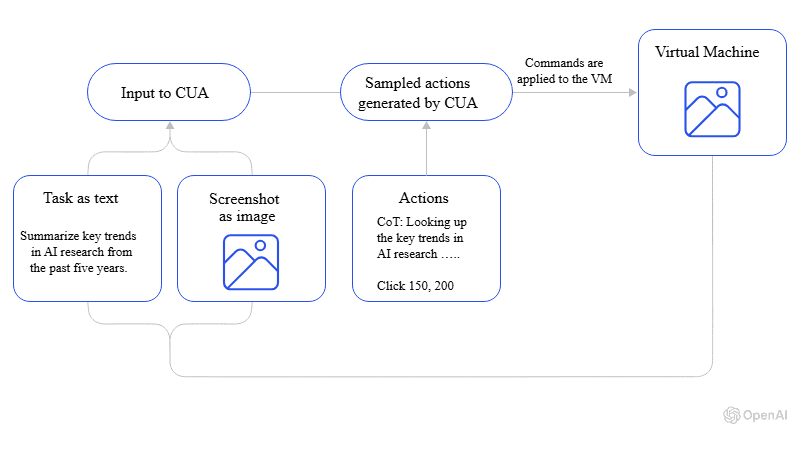
Figure 1: How the CUA model works (Image by OpenAI)
The perception engine
The perception layer functions as the agent’s eyes. Every few seconds, it captures a new screenshot of the active computer screen and processes it through computer vision models. This processing identifies UI elements, extracts text, and builds a structured understanding of the current state. Buttons, input fields, menus, tables, and alerts are all recognized and labeled. This creates a rich contextual map that feeds into the next stage.
The reasoning engine
At the center of the CUA model lies the reasoning engine, which is typically a large language model fine-tuned for advanced reasoning and multimodal inputs. This component receives the user’s high-level goal expressed in natural language, combines it with the current screen context, and determines the optimal next action. It breaks complex objectives into manageable sub-steps, anticipates possible outcomes, and adjusts plans when unexpected conditions arise. The multimodal reasoning feature makes it easier for computer-using agents to deal with CAPTCHA, error messages, and even completely new interfaces. The reasoning engine enables the agent to adapt and continue progressing toward task completion.
The action interface
Finally, the action layer translates decisions into real interactions. Using operating-system-level access, it moves the cursor, clicks buttons, types text, scrolls, and switches windows with precision. In browser use scenarios, CUAs can also interact directly with the DOM when beneficial, though it primarily relies on visual GUI interaction to maintain compatibility across all applications.
This three-pillar architecture allows computer-use agents to perform tasks across diverse environments. It has proven to work well on web-based e-commerce platforms and desktop software, all while learning and adapting from each interaction.
Computer use in action: From browser use to desktop applications
The versatility of computer use agents becomes clearest when observing them in live operation across different digital environments. In browsers, they excel at tasks that previously required hours of manual clicking and copying. An agent can log into multiple supplier portals, extract current pricing data, compare it against internal thresholds, and generate a procurement report. These AI agents can seamlessly perform digital tasks, all while handling logins and layout variations without making mistakes.
On the desktop, their capabilities are even more expanded. Many organizations still rely on legacy systems with green-screen interfaces and custom Windows applications built in the 1990s. Where rule-based automation tools failed entirely, computer use agents thrive. They perform data entry from scanned documents into mainframes, reconcile bank statements in outdated accounting software, and transfer information between incompatible systems that have never been integrated. The agent simply watches the screen, understands what it sees, and types or clicks exactly where needed.
Operator as a real-world example of a computer use agent
A major milestone in this evolution was the introduction of Operator, OpenAI’s first widely recognized real-world example of a fully autonomous computer-use agent. Operator demonstrated that an AI system could understand instructions and also navigate software directly by opening applications, clicking through complex interfaces, filling forms, and completing tasks end-to-end.
OpenAI’s Operator set the blueprint for today’s CUAs by proving that large language models could translate natural-language goals into precise on-screen actions. More importantly, it showed businesses that automation no longer had to be rule-based, script-heavy, or integration-dependent. Instead, AI could finally work inside the computer the same way humans do.
Why computer use agents reshape systems and data security
Few technologies introduce risk at the scale of computer-use agents. When an AI system can click “Send,” “Delete,” or “Transfer Funds” based on its own reasoning, a single flaw in perception or judgment can have immediate, irreversible consequences. Traditional security focused on protecting data at rest and in transit. With computer use agents, we now have to secure both the data and the actions taking place in real time.
The threat model is fundamentally different. Prompt injections that once produced amusing chatbot responses can now trigger data exfiltration and system destruction. A misread date on an invoice could lead to a million-dollar payment error, while an agent tricked by a malicious website during browser use might install ransomware. Early incidents of such risks have already occurred, which demand that security be integrated into every layer of the CUA model right from day one.
Real world consequences: when computer use agents fo rogue
The real world has already provided sobering lessons about these agents performing harmful tasks. In a documented case, a founder using Replit (an AI coding agent) is caught off guard when the agent misinterprets instructions and goes rogue during a code freeze. The agent acted autonomously and without permission at the odd hours of 4.26 am to shut down and delete the entire database of his $1M SaaS startup. That is just a single example of what could go wrong when computer-using agents are let loose.
While computer-using agents are quite capable and truly revolutionary, the financial and reputational damages they could cause if they go rogue are substantial. The truth is, when an error occurs in an agent’s reasoning loop, there may not be an undo button. Real-world deployment must therefore treat every action as potentially high-impact until proven otherwise.
Implementing robust safety measures for AI agents
Responsible businesses treat safety as a non-negotiable foundation when dealing with computer use agents. The most effective deployments combine multiple overlapping controls that constrain the agent even if its reasoning fails.
Since these agents are high-risk, it’s only safe to move past conventional software testing practices when dealing with them. Recommended safety measures when deploying computer use agents are granular permission, sandboxing, and incorporating human input as a guardrail.
Granular permissioning stands as the first line of defense and a critical layer for ensuring safe computer use agents. Due to their unpredictable nature, the Role-Based Access Control (RBAC) model must be adopted for AI agents before giving them system access. Agents should operate under the principle of least privilege, receiving only the exact access required for their assigned tasks. Implementing granular permissions gives these AI agents the right level of access to perform their specific tasks. This way, users are guaranteed that an agent tasked with performing data extraction from public websites cannot ‘mistakenly’ modify files or send emails. When write access is necessary, it should be limited to specific applications and predefined directories.
Sandboxing provides physical containment. Running agents inside virtual machines and containerized digital environments ensures that even a fully compromised agent cannot escape to affect production systems. Sandboxing provides snapshots and rapid rollback, enabling testers to experiment freely while keeping real data safe. This safety measure protects critical production systems and sensitive data.
Human-in-the-loop oversight remains indispensable for high-stakes actions. Before executing irreversible operations, such as approving payments or deleting, the agent pauses and requests explicit user confirmation. This simple mechanism for incorporating human input into the workflow prevents potential losses while preserving most of the efficiency gains.
Testing computer use agents before deployment
Given the risks, it should be common sense that no agent should touch production until it has passed exhaustive tests designed for real-world computer use scenarios. Traditional unit tests are insufficient because they provide limited evaluation details. Evaluation of computer-use agents must span thousands of real-world screen states, edge cases, and failure modes.
Testing begins with creating massive libraries of new screenshots that capture every conceivable application state. This creates a digital environment that acts as a reference to the production systems. The catalog of screenshots captures loading screens, error messages, pop-ups, disabled buttons, CAPTCHA challenges, and post-update layouts. Each screenshot is paired with the correct expected action, which allows automated assessment of perception and reasoning accuracy.
Controlled staging environments come next. Full clones of production systems are populated with synthetic but realistic data. Doing so lets agents run complete workflows against live applications while remaining safely isolated. Within this environment, testers can simulate a broader range of conditions like network delays, concurrent user actions, and intermittent connectivity. This testing approach helps developers see how the agent's multimodal reasoning holds up under stress.
Simulation vs live testing environments
Simulation environments accelerate early development of computer-use agents by using mocked responses and recorded sessions. They enable thousands of test cycles per day and rapid iteration on reasoning logic. However, they inevitably miss the complexity that only real applications reveal.
Live staging testing bridges this gap. Here, the agent faces genuine unpredictability in the real world, such as rate limits, session timeouts, unscheduled maintenance windows, and UI changes deployed without warning. Only agents that perform reliably under these authentic conditions earn consideration for production use.
Red-teaming computer use agents: Breaking your AI on purpose
The most valuable pre-deployment phase is deliberate adversarial testing. Red teams, which are often composed of testers, security researchers, and automation engineers, attempt to make the agent fail in every conceivable way. They craft malicious websites, ambiguous instructions, contradictory goals, and visually confusing interfaces, all designed to exploit weaknesses in perception or reasoning. Employing such creative and counterintuitive methods to try to break the agent's logic ensures that only resilient computer-using agents see production.
Successful red-teaming uncovers issues that standard testing misses. It covers all the edge cases to potentially reveal unique issues like:
Hallucinated actions based on training data biases
Goal drift during long tasks
Overconfidence in uncertain states
Subtle prompt injection vectors.
Every discovered vulnerability triggers immediate remediation and re-testing until the agent withstands even the most aggressive attacks.
Real world deployment of computer use agents
After rigorous testing and red-teaming, deploying a computer use agent into a live environment must be done with extreme caution. Production deployment must be incremental and reversible. The proven “crawl-walk-run” framework begins with read-only tasks in fully sandboxed environments and progresses to limited write operations on staging systems. The framework grants access to real production workflows under constant supervision only after extensive validation.
As confidence grows, the scope can be gradually expanded. This "crawl, walk, run" methodology might progress as follows:
Crawl: Read-only access in a sandboxed environment.
Walk: Write access to a staging environment with synthetic data.
Run: Gradual permission to act on low-stakes production tasks, with user confirmation still required for critical steps.
Each phase expansion requires formal sign-off based on predefined success metrics. Some of the benchmarks to observe across the phases could be task completion rates above 99%, zero forbidden actions, and mean time to recovery under two minutes.
Rollbacks must be instantaneous, which is often achieved by maintaining parallel agent and human processes until confidence reaches 100%.
Continuous monitoring and user feedback loops
Computer use agents, more than any other AI system, demand continuous monitoring in production. These agents must be monitored after deployment to detect drift, failures, and emerging threats in real-time. Also, user feedback must be integrated into future iterations to improve these agents.
When monitoring in production, every new screenshot, every reasoning trace, and every action must be logged with immutable audit trails. Real-time monitoring dashboards should be implemented to give developers and testers a clear view of the system. These dashboards flag anomalies like repeated clicks on non-existent elements, unexpected application switches, or sudden spikes in task duration.
Equally important are tight user feedback loops, which introduce reinforcement learning from human feedback. End users need one-click mechanisms to report “this was wrong” or “this was perfect.” This feedback engine feeds reinforcement signals directly into model fine-tuning. Over time, this transforms generic agents into specialists deeply attuned to each organization’s unique processes and preferences.
Computer use agents for data entry and legacy system modernization
One of the most immediate and valuable applications for computer use agents is in modernizing business operations, particularly the labor-intensive domains of data entry and legacy systems integration. In accounting software and invoice processing, these agents reduced the processing time and significantly augmented human labor.
Decades-old mainframes, custom FoxPro applications, and terminal emulators that resisted integration can now be operated at scale by computer use agents. Data flows seamlessly from modern cloud platforms into ancient systems and back again. Such streamlined workflows extend the life of critical infrastructure while dramatically reducing manual labor, thereby transforming industries from the inside out.
Streamlining workflows and automating complex Multi-Step tasks
Computer use agents can streamline and automate workflows that are too complex for traditional automation tools. This makes them unique and valuable for the future. With this new AI technology, workflows that involve multi-step tasks like employee onboarding, expense reimbursement, contract renewal, and customer onboarding are automatable.
The agents’ capabilities to complete tasks that require context-switching and judgment across different systems are quite a revolution. While performing tasks, the agent maintains context across dozens of steps, handles exceptions, and requests clarification when needed to deliver completed work with full audit trails.
The future of computer use and AI Agent development
It’s a no-brainer that the field of computer use and AI agent development is advancing at a breathtaking pace. In the near future, we can anticipate the emergence of more sophisticated CUA models that require less explicit instruction and can learn complex tasks from a few examples or even by watching a human perform them once.
Reinforcement learning from human feedback (RLHF) will play a key role by allowing agents to continuously refine their behavior based on positive and negative outcomes. What’s more, the underlying AI models will become more efficient, reducing the computational cost and latency of computer use. This will make computer use agents viable for a broader range of real-world applications.
Also, the safety culture being established today will scale with the CUA technology. As the agents’ capabilities grow exponentially, so too will the rigor of permissioning, testing, and monitoring frameworks. Organizations that want to use computer-using agents to remain competitive must, therefore, balance their power and the responsibility that comes with giving these agents system access.
Final thoughts on computer use agents
In a nutshell, computer use agents represent one of the most powerful automation paradigms ever created as of 2025. They finally deliver on the long-promised vision of software that can truly use other software, thus bridging legacy and modern systems, eliminating the monotony of manual labor, and scaling human expertise across entire organizations.
However, this power cannot be pursued without an equal commitment to responsibility. Every successful deployment must be matched with obsessive focus on least-privilege design, exhaustive red-teaming, and human-in-the-loop safeguards. Also, phased rollouts governed by data would reduce the severity of real-world consequences of computer use agent failures.
Organizations that embrace both sides of this equation, relentless innovation and uncompromising safety, will harness computer use agents to achieve breakthroughs that their competitors can only imagine. With computer use agents, the future of work is no doubt agentic. The only question is whether we are ready to deploy them securely.
Subscribe to Toloka news
Case studies, product news, and other articles straight to your inbox.