Describe your data goal. The agent builds the rest.
Describe your full data goal. The agent builds your entire collection and annotation pipeline automatically — and keeps quality in check throughout.
Trusted by Leading AI Teams
Every task in your pipeline.
One platform
RLHF & Preference data
Expert-ranked responses and multi-turn dialogues for complex reasoning and domain-specific tasks — e.g. ranking model outputs on coding or legal reasoning.
Synthetic data validation
Verify LLM-generated training data for factuality and guideline compliance — e.g. checking synthetic RLHF pairs against ground truth.
How it works
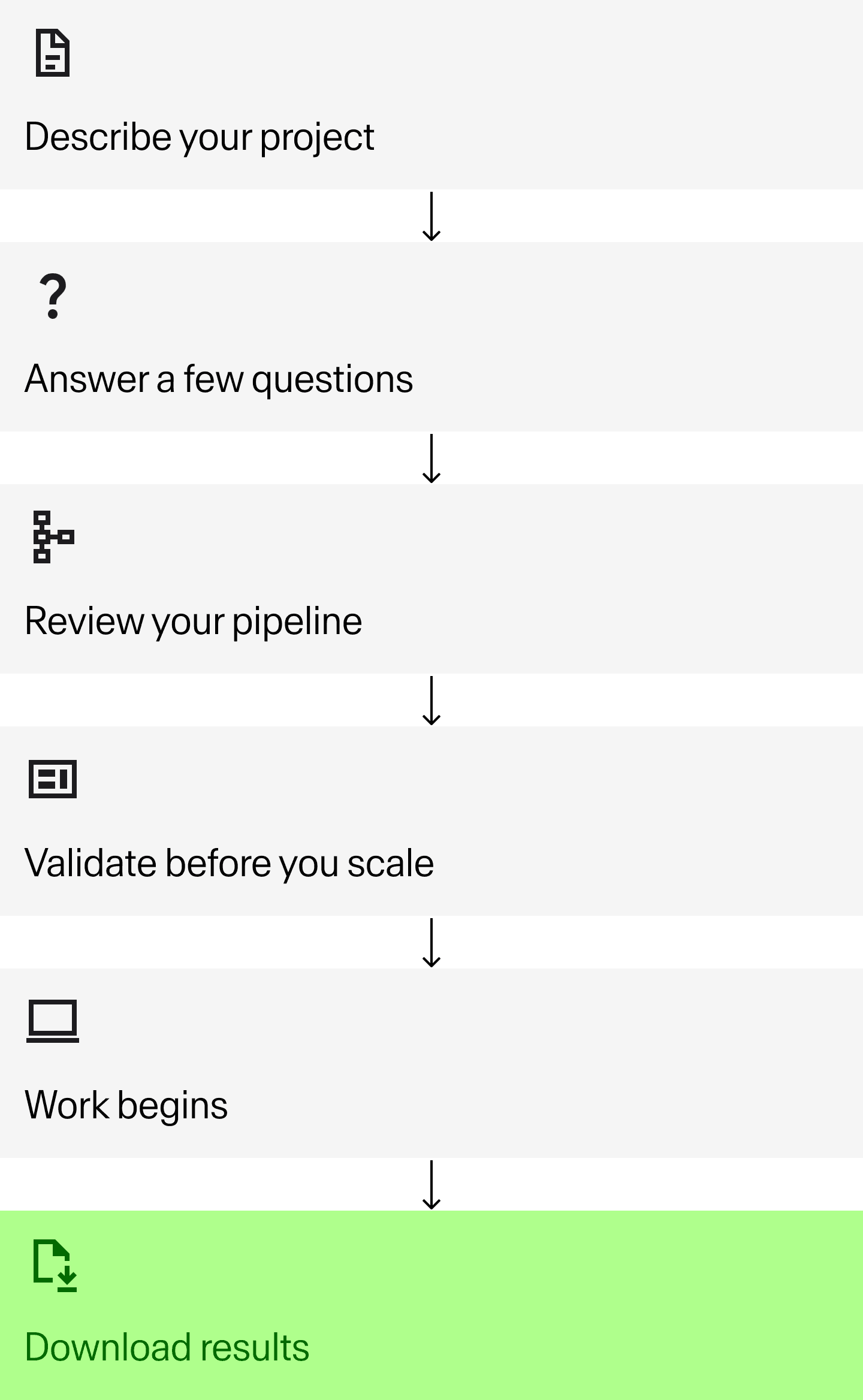
Describe your project
Tell the agent your goal, data type, and use case. Attach reference files or datasets if you have them. You're giving it the full picture, not just a single task brief.
Answer a few questions
Clarify architectural pipeline structure, workforce split, consent flows, regional storage.. Answer once, and the agent builds from there.
Review your pipeline
The agent builds your full multi-stage pipeline automatically. Review each node — data structure, task UI, quality criteria, contributor guidelines, pricing, and QA method — and make any changes before you deploy.
Validate before you scale
Complete a small number of tasks yourself to calibrate LLM QA to your quality bar. Catch anything off before it compounds.
Work begins
Experts label. LLM QA validates every output automatically. Human QA also available. Your feedback improves the QA system as the project runs.
Download results
Validated data, formatted and ready to use. No manual review required.
Use cases



The right expert for every task.
Matched automatically.
200,000+ experts across 90+ domains. Automatically matched to your task and project stage.
Domain experts
Specialists in law, medicine, finance, science, and 90+ domains. Use when the task requires real subject-matter knowledge or the cost of a wrong label is high.
Used for:
Complex reasoning or domain knowledge
Sensitive content or regulated fields
High-stakes model evals
General annotators
Trained generalists for tasks that need consistency and scale, not specialization. Use when quality comes from clear guidelines and good QA, not domain depth.
Used for:
Text generation and annotation
Image and video classification
Preference labeling
Global crowd
High-volume, geographically distributed workforce for straightforward data tasks. Use when speed and scale matter the most.
Used for:
Data collection
Simple annotation tasks
Сontent moderation
Built-in quality
Most platforms leave QA to you. Toloka's LLM QA system runs automatically on every output — before results ever reach your pipeline.
Before your project launches, the agent helps you define quality criteria for every stage of your pipeline.
During labeling, it validates every output in real time, flags edge cases, and iterates based on your feedback.
89.1% accuracy catching failures — before they reach your pipeline. No manual review. No engineering required.
FAQ
" height="28px" id="v_HNFUCmW" transform="translate(10 10)" width="28px"/></svg>)
What are the ideal tasks for Toloka?
Toloka is optimized for generation and annotation tasks, including preference labeling, post-editing, instruction tuning, model evaluation, text enrichment, content moderation QA, and synthetic data validation.
For custom data collection needs, please reach out to our team.
How much does Toloka cost?
Project price is calculated transparently after clarifying the setup based on the project’s needs. Toloka has no hidden fees, no minimums, and no contracts. You only pay for work that passes QA.
How does the quality assurance process work?
QA starts with guidelines you set during project setup, calibrated on a few sample tasks. From there, every item is automatically checked by our LLM-based QA system, which flags errors, ambiguity, and guideline drift. Human QA is also available if needed. Flagged items loop back automatically, and your feedback continuously improves the system, so quality stays high without ongoing manual oversight from your team.
Why is user quality calibration within a project’s setup important?
User quality calibration helps ensure both you and our system want the same thing and are aligned on the definition of quality. By manually labeling and reviewing one or more tasks, you can explain to our agent the nuances that may appear within the project guidelines. Based on the information you provide, Toloka can suggest ways to tweak your project setup - whether it’s the guidelines, configuration, or more.
How quickly can I get results?
Most Toloka projects begin within hours. Turnaround depends on task complexity and volume. Simple classification tasks with the General expert tier can be completed in 24-48 hours, while complex domain-expert evaluations may take longer.
What makes the expert tiers different?
Domain Experts are credentialed specialists in fields like medicine, law, and finance for tasks requiring specialized knowledge in a field. AI Tutors are RLHF-trained annotators who follow complex rubrics for preference labeling and instruction tuning. General experts handle scalable, high-volume tasks like classification and categorization. The AI Assistant recommends the optimal tier mix based on your task requirements and budget.
Do I need technical experience to use Toloka?
No coding or data science expertise required. The AI ssistant guides you through task design with clarifying questions, automatically configures quality controls, and recommends the right expert tier. You describe your task in plain language and approve the setup, then the platform handles the technical implementation.
What if I need additional / tech support?
You can contact our support team directly from the platform. For more complex projects and requirements, please reach out to our team.
Is there any onboarding required?
You can just sign up and start using Toloka.
How can I pay for my projects?
Credit can be added via credit card, processed by Stripe. If your companies require bank transfers, please reach out to our team.
Trusted by Leading AI Teams
Start your first project today
Enterprise quality.
Results in 24-48 hours.
Prefer data services managed for you? Our team will work with you to find the option that best suits your needs.